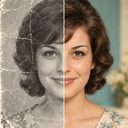
A still moment.
A little movement.
Turn an old family photograph into a short AI-generated video with PixAgain. A new way to enjoy a familiar picture, with a clear distinction between memories and imagined motion.

Your first successful restoration is free.
Choose a clear, respectful starting image
Use a photograph you have permission to process. A visible, well-defined face and a clean source give the model more information. A damaged print is often worth restoring first, then saving that result before choosing it for animation.
From your gallery to a short video
Switch to Video in PixAgain, choose the photograph and start the animation. Processing requires internet access. The current video is approximately six seconds long; download the completed result if you want to keep it.
Motion is created, not recovered
The model invents expressions and movement. It cannot retrieve a real moment that was never filmed, and a result may look unfamiliar or contain visual errors. Tell people that it is an AI animation when you share it, especially with family photographs that carry strong emotions.
Video is included in weekly plans
Lite includes two video generations per seven days alongside ten photos. Premium+ includes ten videos and one hundred photos. Video allowances are separate from photo allowances. The free photo and the one-time Mini pack do not include video.
That photo you love.
See it clearly again.
Start with one free restoration. Decide what comes next after you see your result.
Your first successful restoration is free.